Command | Clipboard
Last updated: June 3, 2026
Automatically captures any text that is copy-pasted into the note and populates it into the Clipboard command.
To enable the Clipboard command, the practice must contact Canvas Customer Support to activate this permission.
Using the Clipboard Command
Within a new or existing note in a patient chart, paste the copied text into a blank line
This command can also be typed into the note as well prior to pasting
A
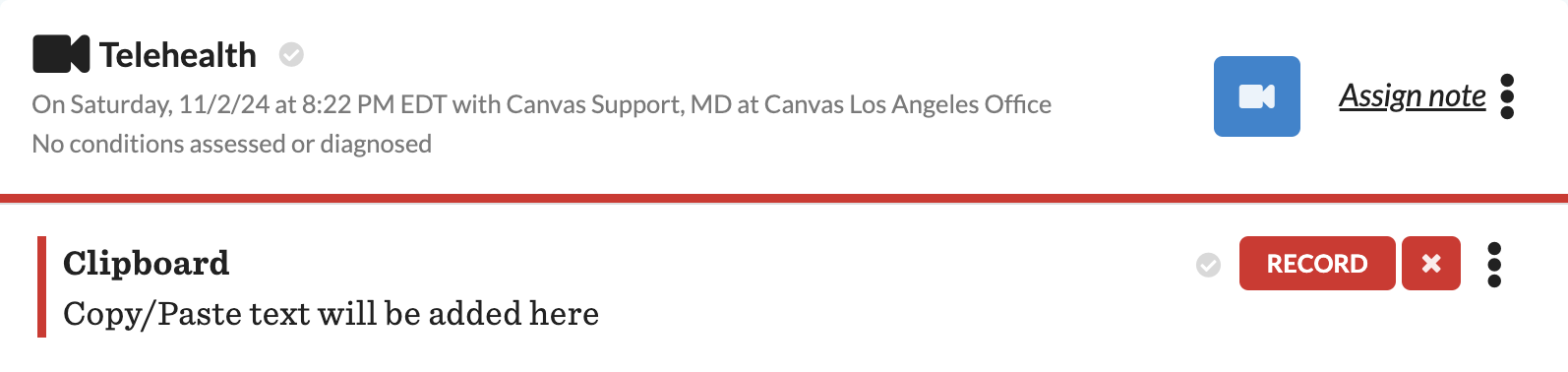
Clipboardcommand will populate to support the pasted text.The
Clipboardcommand is free text only and will need to have text in the field to commit the commandOnce all needed text is in the command, click
Recordto commit
Clipboard and AI Scribe
The Clipboard command must be enabled for AI Scribe parsers to work with pasted text.
When Clipboard is active, Canvas captures pasted text in a Clipboard command. AI Scribe parsers can then use that content to generate structured commands in the note.
Important: If the Clipboard command is not enabled on your instance, pasted or dictated text will not be parsed into structured commands. In that case, AI Scribe may appear not to work.
Troubleshooting
Confirm that the
Clipboardcommand is enabled for your instance.Paste text into a blank line in a note and verify that a
Clipboardcommand appears.If the Clipboard command does not appear, contact Canvas Customer Support to activate it.
Details
Printing: Disabled for this command. Context will not appear on any printed documents or full chart PDFs.
Any content recorded in this command will not become a part of the patient record when shared externally.
Category: Clipboard is categorized as an Internal Command
A red designation is used to decipher the internal command. This will be visible to the left of the command and in the note heading.