ePrescribing (eRx) Enrollment
Last updated: February 18, 2026
After you submit an ePrescribing (eRx) enrollment request through the Provider Enrollment Dashboard, Canvas Support works with Surescripts to obtain the provider's SPI and enable electronic prescribing.
What you'll learn
What ePrescribing enables
What happens after you submit enrollment
How to track SPI status
Change of Vendor considerations
When the provider can start prescribing
What ePrescribing Enables
Once enrolled, providers can electronically send prescriptions for non-controlled medications directly to pharmacies. This includes antibiotics, blood pressure medications, antacids, and any medication that's not a Schedule II-V controlled substance.
Need to prescribe controlled substances? That requires separate EPCS enrollment. See Electronic Prescribing of Controlled Substances (EPCS) Enrollment.
After You Submit Enrollment
Here's what happens on the backend.
Canvas Support receives your enrollment request
Canvas coordinates with Surescripts to obtain the provider's SPI
Surescripts processes the request and assigns the SPI
Canvas Support notifies you when enrollment is complete
Tracking SPI Status
You can check the status yourself anytime.
Go to the Triple Line Menu > Provider Enrollment
Find the provider
Click the provider's name to expand their details
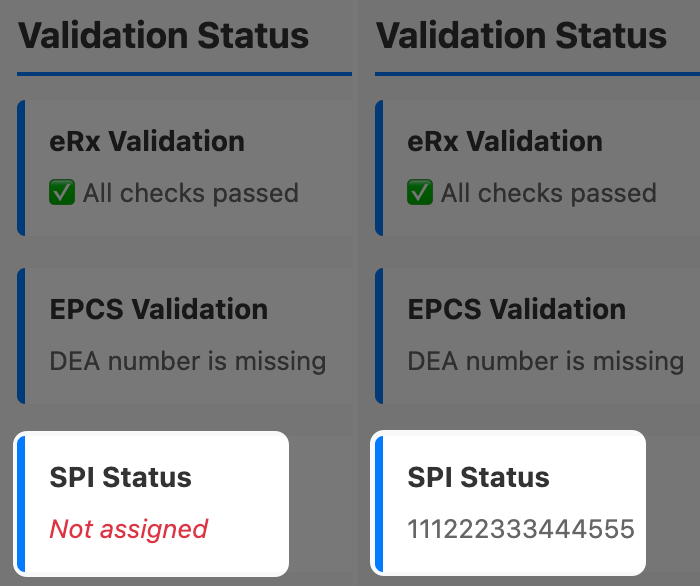
Review the SPI Status under Validation Status
Not assigned: Enrollment still processing
Numbers listed: SPI obtained, provider can prescribe
Change of Vendor Considerations
Providers can only receive electronic refill requests under one account per practice location. If the provider already receives electronic refills under another account for the same practice location, a Change of Vendor is required to receive refills in Canvas.
If Change of Vendor is needed
Canvas Support handles this during the enrollment process
If you are aware a COV is needed prior to enrollment, make a note in the enrollment form
If not, Canvas Support will notify you and confirm you want them to proceed with COV
The COV process can take 1-2 weeks
Not ready to switch yet? No problem—just let Canvas Support know your preferred date. At least 7 days notice is preferred.
If the provider doesn't want to process a Change of Vendor
Refills can still be received via fax
Faxed refill requests will be routed to Data Integration and need to be manually linked and processed in the patient's chart
If the provider never had electronic refills
No Change of Vendor needed
This will automatically apply when the SPI is created with Canvas
Next Steps
For controlled substance prescribing: Submit EPCS enrollment via the Provider Enrollment Dashboard. See Electronic Prescribing of Controlled Substances (EPCS) Enrollment.
For lab ordering: Submit Lab Ordering enrollment via the Provider Enrollment Dashboard. See Lab Ordering Enrollment.
Frequently Asked Questions
Timeline and process
Q: How long does enrollment take from start to finish?
A: Typically 1-3 business days after submitting via the Provider Enrollment Dashboard. If there's any delay on Canvas' end, our support team will notify you with an updated timeline.
Q: When can the provider start prescribing?
A: As soon as Canvas Support confirms the SPI has been obtained. No additional setup needed—prescribing is immediately available in Canvas.
Q: Can my provider prescribe controlled substances after this?
A: No. ePrescribing only covers non-controlled medications. Controlled substances require additional EPCS enrollment with DrFirst.
Q: What happens if I try to prescribe before the SPI is obtained?
A: The prescription will fail. Canvas won't allow it through until the Surescripts connection is confirmed and an SPI has been obtained.
Q: How will I know when enrollment is complete?
A: Canvas Support sends notification when the SPI is obtained. You can also check the Provider Enrollment Dashboard—the SPI Status will display the SPI number once it's been created.
Change of Vendor
Q: What if we switch to Canvas from another EMR?
A: Each provider who received electronic refills under another account for the same practice location needs a Change of Vendor. Canvas Support handles this during enrollment—just let them know in your enrollment ticket. Providers who never had electronic refills don't need it.
Q: How long does Change of Vendor take?
A: It can take 1-2 weeks since it processes through Surescripts.
Q: Will the provider lose access to their old EMR during the transition?
A: Refill requests will route to Canvas once Change of Vendor completes. Coordinate timing with your previous EMR vendor to ensure a smooth transition.
Patient data
Q: Why do patients need a complete address for prescriptions?
A: Pharmacies use this to verify they're filling prescriptions for the correct person. The address confirms location and helps prevent fraud.
Q: Do I need to update all patient records before the provider starts prescribing?
A: No need to do it all at once. Most providers update patient records during the prescribing workflow when they encounter an error.
Multi-location
Q: Do I need separate enrollments for each practice location?
A: No. ePrescribing enrollment is per provider, not per location. One enrollment enables prescribing across all locations where they're credentialed.
Related Articles
Keywords: ePrescribing, eRx, SPI, Surescripts Provider Identifier, prescriptions, enrollment timeline, patient information, Change of Vendor, non-controlled medications
Categories: Provider Enrollment, ePrescribing
Roles: Practice Manager, Administrator, Clinical Staff